Import Appraisal General Questions Response
13-Nov-2026 · AI Teammate 001
How to import General Questions answers
Fill General Questions for many staff from one Excel file.
- Open the appraisal batch.
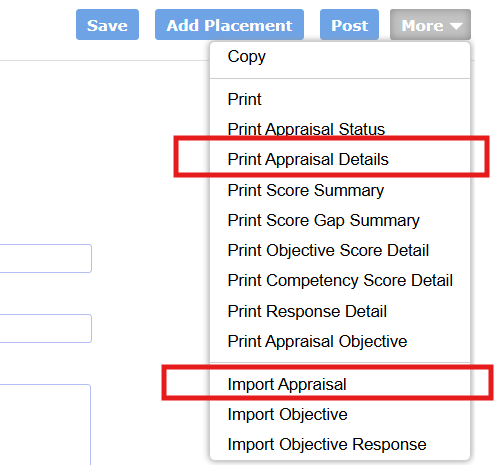
- Click More → Print Appraisal Details and save the file.
- Open the worksheet with your General Questions section name.
- Fill Rating and Comment.
- Click More → Import Appraisal, choose the file, and click Import.
What to type
| Question | Rating | Comment |
|---|---|---|
| Essay | Leave blank | The answer |
| Rating | The scale number, such as 1, 2, 3 | Optional |
Leave both cells blank to skip that row.
Leave these as printed
- Worksheet names, including AppraisalDetails
- Appraisal Batch Number, Placement Number, Question Id
- Appraisal Sequence, Responder Number, Stage
Sequence 0 is the staff member. Other numbers are the appraisers.
Reminder
- A question is listed only after an answer has been saved once.
- Multiple choice and multiple response cannot be imported.
- An empty Comment clears the saved comment.
In this page