Smtp Settings
09-Sep-2026 · Wing Au Yeung
其他語言版本 English
其他語言版本 English
Why set up Smtp Settings?
Backstage sends emails for leave applications, payslips, tax forms, password resets and other notifications. Those emails go out through your company's mail server (SMTP).
Smtp Settings is where you tell Backstage which mail server to use, which mailbox to send from, and how to log in. If this page is blank or wrong, staff will not receive system emails.
Ask your IT team for the SMTP host, port, user name, password, whether SSL is required, and the mailbox Backstage should send from. You do not need to guess these values.
Where to find Smtp Settings
- Open the System Menu at the top right (the user menu, where you log out)
- Click Smtp Settings
This used to live on Settings. From July 2024 the SMTP fields have their own page.
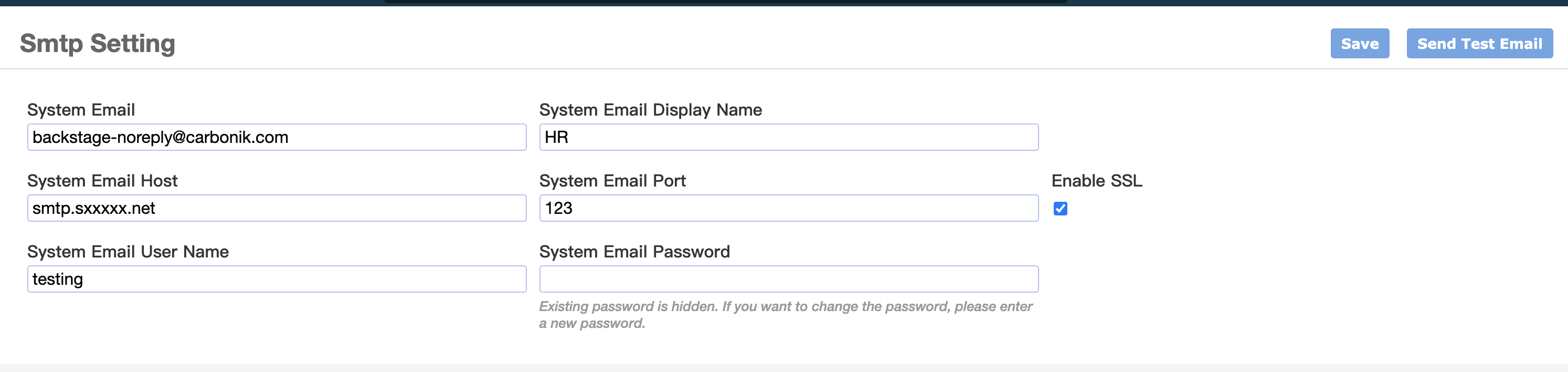
What each field means
| Field | Description |
|---|---|
| System Email | The From address on emails Backstage sends (for example hr@yourcompany.com or noreply@yourcompany.com). |
| System Email Display Name | The name recipients see in their inbox, for example HR. This is not the login name. |
| System Email Host | The SMTP server host name from your IT team or email provider, for example smtp.office365.com or smtp.gmail.com. |
| System Email Port | The SMTP port. 587 is the usual value for Microsoft 365 and Gmail. |
| Enable SSL | Tick this when the mail server requires a secure connection. This is typical for Microsoft 365, Gmail and most hosted email. |
| System Email User Name | The account used to log in to the SMTP server. This is often the same as System Email, but your IT team may give you a different value. |
| System Email Password | The password (or app password) for that account. The saved password is hidden. Leave the field blank to keep the current password. Enter a value only when you want to change it. |
How to set up SMTP
- Get the SMTP details from your IT team (host, port, SSL, user name, password, and the From address)
- Go to System Menu -> Smtp Settings
- Fill in the fields using the table above
- Click Save
- Click Send Test Email
- A slide-in opens
- Enter your own email address
- Click Send Test Email again
- Check that inbox (and junk / spam) for a message with subject Backstage - Test Email
Save before you test. Send Test Email uses the values already saved, not the unsaved text on the form.
Typical values (confirm with IT)
These are common starting points. Use the values your IT team or email provider gives you if they differ.
| Provider | Host | Port | Enable SSL | Notes |
|---|---|---|---|---|
| Microsoft 365 / Outlook | smtp.office365.com |
587 | Yes | User name is usually the full mailbox address. Outlook may limit how many emails can be sent per minute — see Check Email cannot be Sent. |
| Gmail | smtp.gmail.com |
587 | Yes | Use an App Password, not the Google account password. Steps are on SMTP Tester. |
| Company mail server | From IT | From IT | From IT | IT may also need to whitelist the Backstage server so it is allowed to send. |
If the test email fails
- Confirm Save was clicked after the last change
- Check user name, password, host, port and Enable SSL with IT
- For Gmail, confirm you are using an App Password
- Ask IT whether the Backstage server needs to be whitelisted
- Go to System Menu -> Email Log and open the failed row to read the error message
- If you still cannot connect, use SMTP Tester on a PC to try the same host, port, user name and password outside Backstage
More on reading Email Log and resending: Check Email cannot be Sent.
To change the subject, body or recipients of system emails (not the mail server), use Email Template.
本頁內容